Plan the Program: Audience and Decision Tree
A planning lesson focused on user needs, design choices, and mapping logic before coding begins.
This page is the planning foundation of the Pet Services project. It frames the program as a user-focused system rather than a random collection of code.
Project Navigation
Planning Goals
- identify the user and what they need from the program
- define required inputs before writing code
- map decision paths so logic is predictable
Required Inputs
- pet name
- breed
- age
- size (or another selected characteristic)
- requested service type
Decision Tree Requirements
- each decision has a clear
yesandnopath - invalid input paths return to input stage
- final branches end with a valid booking summary
Suggested Structure
- collect user input
- validate service type
- apply price rules by age/size/service
- output booking summary and total cost
Planning Checkpoint
- your flowchart matches what the future code must do
- no decision point is left without an outcome
- logic can be explained verbally before coding starts
🧾 Assessment Criteria that you are learning to meet
While this project is not assessed, it is building your skills in user-centred design and algorithmic thinking. The criteria below are the key things your work should demonstrate in Lesson 1.
- Target audience is clear and realistic
- Needs/interests are specific (not vague)
- Features are justified using user needs
- Extra feature improves user experience
- Choices are explained with a “because…”
- Design matches the audience (age, goals, preferences)
- Decision tree shows a clear program flow
- Branches are labelled (valid vs invalid inputs)
- Steps connect to project requirements (inputs → decisions → output)
- Proto personas have enough detail to feel “real”
- Decision tree conventions are followed correctly
- Your explanation is understandable (not just bullet fragments)
🐾 Mini Project: Pet Service Booking System
Over the next week, you will design and build a Python program that simulates a pet grooming or pet service booking system.
Your program will collect information from a user, make decisions based on that information, and then display a clear booking summary at the end.
Lesson 1 focus: Understanding the user and planning your program logic before writing code.
📋 Project Requirements
User Input
- Pet name
- Pet breed
- Pet’s age (in human years)
- Another characteristic of the pet (for example: size)
- Type of service requested (bath, haircut, full grooming)
Conditional Statements
- Use if / elif / else statements to calculate the total cost of the service based on characteristics of the pet and the selected service.
Program Output
- Display a clear booking summary that includes all information entered by the user at the start of the program.
🎯 Learning Intentions
- I can clearly explain my program and how it meets the user’s needs.
- I understand my target audience through the use of proto personas.
- I can design a decision tree that shows the logic of my program.
✅ Lesson 1 Student Checklist
Use this checklist to keep yourself on track. Before the end of the lesson, you should be able to tick off every item.
☐ I can explain who the target audience is for my pet booking program.
☐ I have listed what my target audience might care about (needs, interests, what makes the program easy to use).
☐ I have suggested at least one extra feature that would improve the user experience.
☐ I have created two proto personas with enough detail to show why they would use this program.
☐ My proto personas include realistic details (age, goals, preferences, what they want from the program).
☐ I have started (or completed) a decision tree that shows the program flow.
☐ My decision tree uses the correct conventions:
-
- ☐ Diamonds for user input
- ☐ Rectangles for computer output
- ☐ Colours for valid vs invalid inputs
- ☐ Directional arrows labelled with user inputs and/or stored variables
- ☐ I have replied to this discussion with my two proto personas.
🧠 Activity 1: Target Audience Brainstorm (Group Activity)
Before writing any code, we need to think about who this program is for. Work in small groups of no more than 4 students.
Group Brainstorm
- Who is the target audience for this program?
- What might they care about or find important?
- What functionality would they expect from a pet service booking system?
- What extra features might make the program easier or nicer to use?
Assessment focus: Purposeful evaluation of user experience that justifies program features based on the target audience.
👤 Activity 2: Proto Personas (Individual activity)
A proto persona is a fictional user that represents a real type of person who might use your program.
Example:
Student Persona A is a 13-year-old student who enjoys problem-solving games. They own a medium-sized dog and want a simple text-based program that lets them quickly book grooming services without confusion.
Why do we create proto personas?
- To understand user needs before coding
- To guide design and feature decisions
- To avoid building programs that only make sense to the programmer
Your task:
- Create two proto personas for your pet booking service
- Include enough detail to explain why each person would use the program
🌳 Activity 3: Decision Tree Design (Individual activity)
A decision tree shows how your program will behave based on different user inputs. This helps you plan your logic before writing Python code.
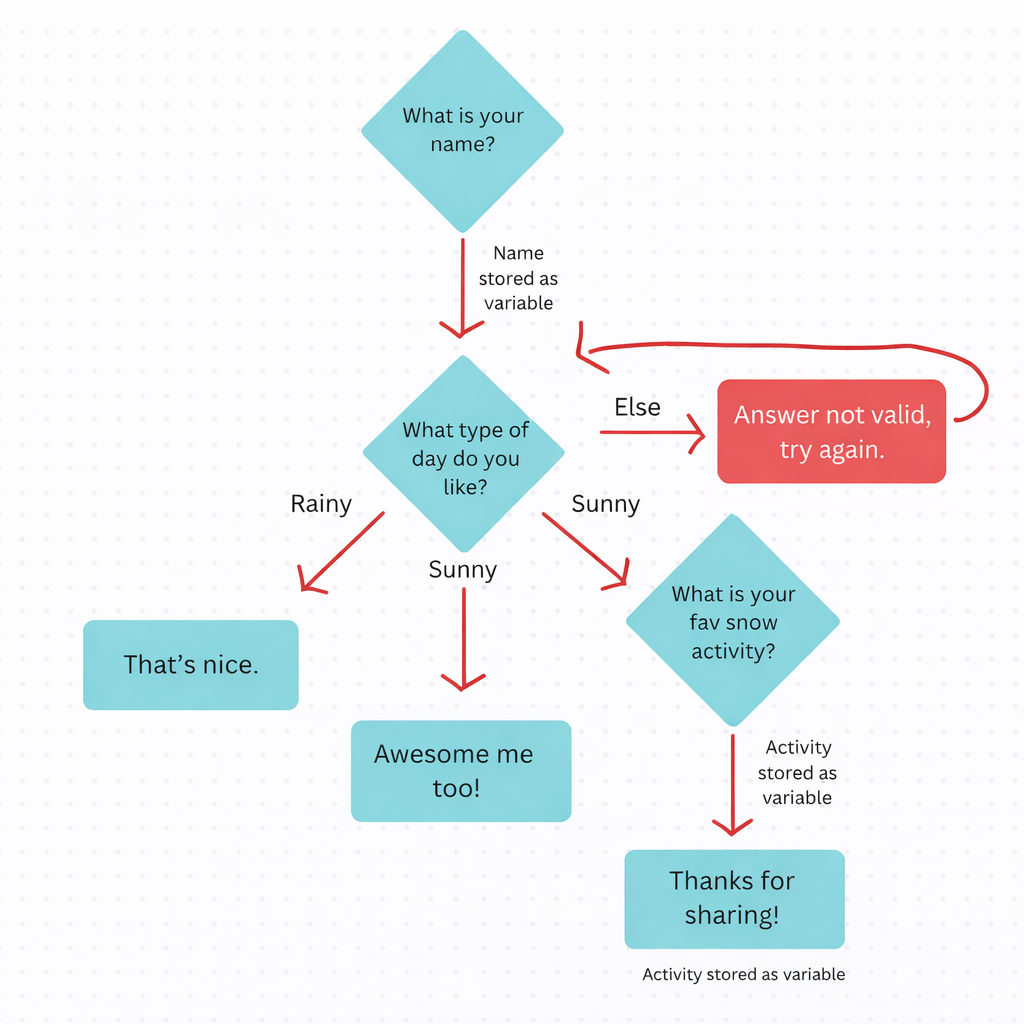
Decision trees use specific conventions:
- Diamonds for questions requiring user input
- Rectangles for computer output (no input required)
- Colours to separate valid and invalid inputs
- Directional arrows with labels showing user input or stored variables
Your task:
- Create a decision tree for your Pet Service Booking System
- Show how different user choices change the program’s behaviour
- Follow all decision tree conventions accurately
Assessment focus: Purposeful design of algorithms. The decision tree should clearly show the program flow.
💬 Discussion Submission
Reply to this discussion with:
- Your two proto personas