Education digital-technologies year-9
Worked Solution: Booking System
A teacher-style walkthrough showing how planning and decision logic translate into a complete Pet Services solution.
This worked example shows how the planning decisions, validation logic, and structure all connect in a full version of the program.
Project Navigation
🐾 Solution Page: The Pet Service Booking System Program
This is the full “from scratch” workflow in one place. The idea is simple: if the plan is clean, the code is clean. If the plan is messy, the code will be a pain. We’re going to keep it specific, reasonable, and easy to build with the Python skills we’ve learned so far.
✅ Why we plan first (and not “just start coding”)
When you skip planning, you end up making decisions in your code while you’re already confused. Then you get stuck, then you add random fixes, then your program turns into spaghetti.
So we’re doing it properly: we’ll decide the rules, we’ll break the problem into chunks, we’ll map the logic, and only then we write Python.
📌 Step 1: Lock in the scope (your “program contract”)
Before we do anything else, we lock the rules. This stops feature creep and keeps the code realistic. If something isn’t in the contract, it doesn’t / /shouldn't magically appear later.
Contract rules (this is what the program is allowed to do):
Purpose: Book a dog grooming service and calculate the cost.
Pets: Dogs only.
Dog size categories: Small (0–10kg), Medium (10–25kg), Large (25kg+).
Services: Bath, Haircut, Full grooming.
Pricing rule: The base cost must depend on service + size (otherwise collecting size is pointless).
Age rules: If age < 1 → 10% discount. If age ≥ 10 → +$5 fee.
Output: A booking summary that shows all details + base cost + final total.
🧩 Step 2: Decompose the problem (turn it into chunks)
This is the part where we stop thinking “one massive program” and start thinking “a few small steps”. Each chunk becomes a section of your decision tree, and later it becomes a block of code.
Chunk A — Welcome + instructions
You tell the user what the program does and what inputs are allowed, so they don’t guess.
You tell the user what the program does and what inputs are allowed, so they don’t guess.
Chunk B — Collect inputs
Name, breed, age, size category, service choice.
Name, breed, age, size category, service choice.
Chunk C — Validate inputs
This is where while loops belong. If the user types something invalid, the program asks again (politely).
This is where while loops belong. If the user types something invalid, the program asks again (politely).
Chunk D — Calculate base cost
Base cost uses service + size. Store it as
Base cost uses service + size. Store it as
base_cost.Chunk E — Apply modifiers
Start with
Start with
total_cost = base_cost, then apply the puppy discount / senior fee rules.Chunk F — Output booking summary
Print a summary that feels like a real booking confirmation.
Print a summary that feels like a real booking confirmation.
🔁 Step 3: Where loops belong
While loops (repeat until valid)
If your program just accepts bad input and keeps going, it’s not a booking system. It’s a random text adventure. So we use while loops for the boring-but-important part: validation.
You’ll use them to keep asking for dog size and service until they’re valid. If you want to be extra tidy, you can also validate that age is a sensible number.
For loops (repeat across a list)
For loops are perfect when you have a list of things and you don’t want to repeat yourself. In the final code, we’ll deliberately use two different for loops, because both are useful and both make your program cleaner.
One for loop will print the service menu from a list (so it looks neat and you don’t write 3 separate print lines).
Another for loop will print the booking summary lines from a list (so your summary formatting stays consistent).
Another for loop will print the booking summary lines from a list (so your summary formatting stays consistent).
(We’ll do the actual code later. Right now, the important thing is knowing where and why loops belong.)
🧾 Step 4: Activities 1–3
Below are example responses for the three activities. These are written the way a strong student response should look: specific, defendable, and actually useful when you start coding.
Activity 1 — Target Audience Brainstorm (example response)
Target audience
For this example, the program is made for a teenager who owns a dog and wants to book a grooming service without needing an adult to do it for them. They’re comfortable typing, but they don’t want anything complicated or confusing.
What the user would care about
They would care about the program being quick and clear. They want to enter their dog’s details, choose a service, and see the cost. They would also want the booking summary at the end to be correct, so they can check they didn’t type something wrong.
What the program should do (and what it’s limited to)
The program is for dogs only, and it only uses three size categories: small (0–10kg), medium (10–25kg), and large (25kg+). That keeps the design simple and makes the code easier to build and test.
Two extra features (still simple)
If the dog is under 1 year old, the program gives a 10% discount on the total cost. The logic would be: multiply the total cost by 0.9.
If the dog is 10 years or older, the program adds a $5 senior care fee. The logic would be: add 5 to the total cost.
Activity 2 — Proto Personas (example response)
Proto persona 1
Name: Liam Carter
Age: 14
Pet: Small dog (Cavoodle, 8kg)
Dog’s age: 6 months old
Age: 14
Pet: Small dog (Cavoodle, 8kg)
Dog’s age: 6 months old
Liam likes things that are quick and easy to use and doesn’t want to read a lot of instructions. He wants a simple text-based program where he can type his dog’s details, choose a service, and see the total price straight away.
Because his dog is under 1 year old, the 10% puppy discount would apply. That makes sense to him and feels fair.
Proto persona 2
Name: Sarah Nguyen
Age: 15
Pet: Large dog (German Shepherd, 32kg)
Dog’s age: 11 years old
Age: 15
Pet: Large dog (German Shepherd, 32kg)
Dog’s age: 11 years old
Sarah is responsible and helps take care of her older dog. She wants to choose the correct service and understand the final cost before confirming anything. She would like the program to clearly show the size category and the service choice in the summary.
Because her dog is 10 years or older, the $5 senior care fee would apply. That makes sense because older dogs may need extra care during grooming.
Note: These two personas are not random. They’re basically test cases. One triggers the puppy discount, one triggers the senior fee, and they also use different dog sizes.
Activity 3 — Decision Tree (example response)
The decision tree needs to show the full logic from start to end. That means it must include input collection, validation (invalid inputs loop back), base cost calculation (service + size), then the age-based price changes, and finally the booking summary output.
📌Decision Tree Image
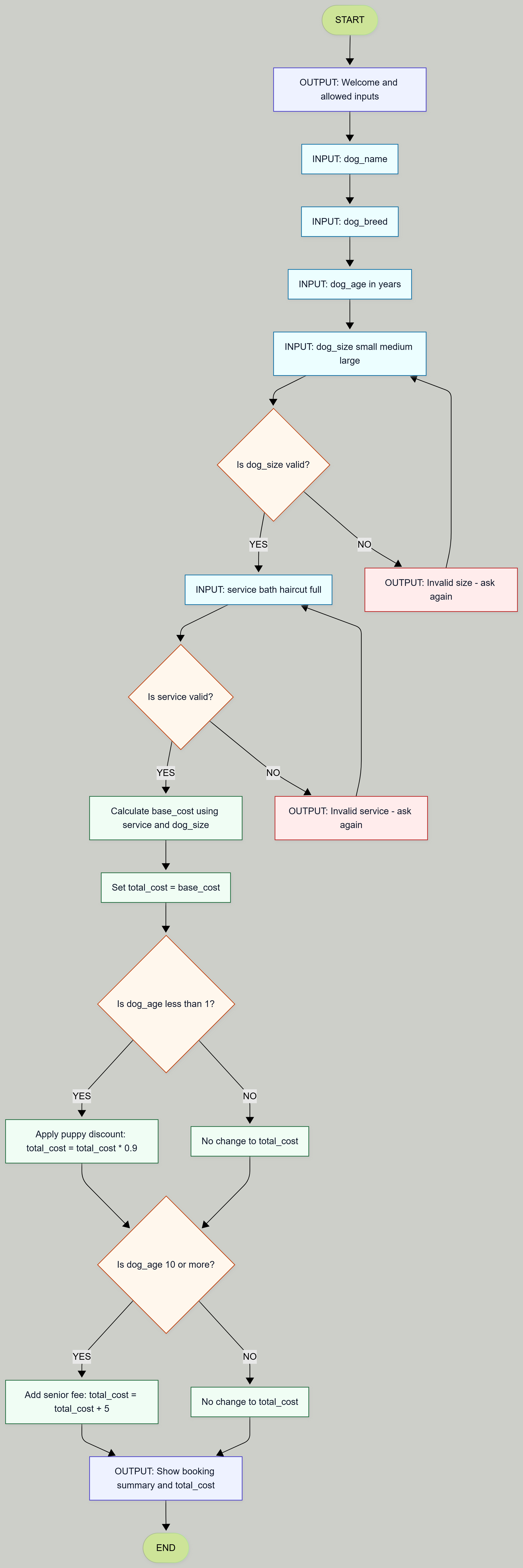
Note: Every decision needs a YES and a NO outcome. Even “no change” is still an outcome. If you don’t show it, your decision tree is incomplete.
🧠 Step 5: Variables (what we’ll store as we go)
Before coding, it helps to know what information you’re storing. That way you don’t randomly invent variables half-way through your program.
dog_name (text)
dog_breed (text)
dog_age (number)
dog_size (text: small/medium/large)
service (text: bath/haircut/full)
base_cost (number)
total_cost (number)
🧱 Step 6: Code structure (still planning, not full code yet)
This is the “shape” of the Python program. When the decision tree is correct, this part is basically just translating English into Python.
1) Print a friendly welcome + what inputs are allowed
2) Ask for dog_name and dog_breed
3) Ask for dog_age (and re-ask if it’s not a sensible number)
4) Ask for dog_size (and re-ask until it is small/medium/large)
5) Use a for loop to print the service menu neatly (Option 1)
6) Ask for service (and re-ask until it is bath/haircut/full)
7) Calculate base_cost using service + dog_size (if/elif/else)
8) Set total_cost = base_cost
9) If dog_age < 1, apply the 10% discount (otherwise: no change)
10) If dog_age ≥ 10, add the $5 senior fee (otherwise: no change)
11) Print a clean booking summary that feels like a confirmation
12) Use a for loop to print summary lines neatly (Option 2)
Note: Complexity for no reason gets no marks. If you can’t explain why something is in your program, it probably shouldn’t be there.
🧠 Final Code – Pet Service Booking System
This is the complete program that matches the planning and decision tree above. Read the comments carefully - they explain what is happening at each step and why it belongs there.
# ------------------------------------------
# Pet Service Booking System
# ------------------------------------------
# This program collects dog information,
# calculates grooming cost based on size and service,
# applies age-based modifiers,
# and prints a clear booking summary.
# ------------------------------------------

# ---- Chunk A: Welcome and Instructions ----

print("Welcome to the Dog Grooming Booking System.")
print("This program is for DOGS only.")
print("Size categories: small (0–10kg), medium (10–25kg), large (25kg+).")
print("Services available: bath, haircut, full.")
print("--------------------------------------------")


# ---- Chunk B: Collect Basic Inputs ----

dog_name = input("Enter your dog's name: ")
dog_breed = input("Enter your dog's breed: ")


# ---- Chunk C: Validate Age Input Using a While Loop ----
# We keep asking until the user gives a sensible number.

while True:
    dog_age_input = input("Enter your dog's age in years: ")

    # Check if the input is a number
    if dog_age_input.isdigit():
        dog_age = int(dog_age_input)

        # Age cannot be negative
        if dog_age >= 0:
            break
        else:
            print("Age cannot be negative. Try again.")
    else:
        print("Please enter a valid whole number for age.")


# ---- Validate Dog Size ----
# This while loop ensures size is one of the allowed options.

valid_sizes = ["small", "medium", "large"]

while True:
    dog_size = input("Enter dog size (small / medium / large): ").lower()

    if dog_size in valid_sizes:
        break
    else:
        print("Invalid size. Please type small, medium, or large.")


# ---- Display Services Using a For Loop ----
# Instead of writing 3 separate print statements,
# we loop through a list.

services = ["bath", "haircut", "full"]

print("\nAvailable services:")
for service_option in services:
    print("-", service_option)


# ---- Validate Service Choice ----

while True:
    service = input("Choose a service: ").lower()

    if service in services:
        break
    else:
        print("Invalid service. Please choose from the list above.")


# ---- Chunk D: Calculate Base Cost ----
# Base cost depends on BOTH service and size.

if service == "bath":
    if dog_size == "small":
        base_cost = 20
    elif dog_size == "medium":
        base_cost = 25
    else:
        base_cost = 30

elif service == "haircut":
    if dog_size == "small":
        base_cost = 30
    elif dog_size == "medium":
        base_cost = 35
    else:
        base_cost = 40

else:  # full grooming
    if dog_size == "small":
        base_cost = 45
    elif dog_size == "medium":
        base_cost = 50
    else:
        base_cost = 60


# ---- Chunk E: Apply Age Modifiers ----

total_cost = base_cost  # Start with base cost

# Puppy discount
if dog_age < 1:
    total_cost = total_cost * 0.9  # Reduce by 10%

# Senior dog fee
if dog_age >= 10:
    total_cost = total_cost + 5


# ---- Chunk F: Output Booking Summary ----
# We store summary lines in a list and print them using a for loop.

summary_lines = [
    "\n----- Booking Summary -----",
    f"Dog name: {dog_name}",
    f"Breed: {dog_breed}",
    f"Age: {dog_age} years",
    f"Size category: {dog_size}",
    f"Service selected: {service}",
    f"Base cost: ${base_cost:.2f}",
    f"Final total cost: ${total_cost:.2f}"
]

for line in summary_lines:
    print(line)

print("----------------------------")
Note: Notice how every part of this code matches a chunk from the plan and a section of the decision tree. Nothing here is random. If you can’t point to where something appears in the planning, it probably shouldn’t be in your program.
🔁 Wrapping It Up - What was this whole process about?
Take a second and zoom out.
We didn’t just “write some code”. We didn’t randomly start typing Python and hope it worked. We started by locking the scope. Then we decomposed the problem. Then we mapped the logic in a decision tree. Only after that did we translate the logic into code.
That order is very important if you want to develop as programmers.
Clean code isn’t magic. It’s the result of clean thinking.
What skills did we actually use?
Youve learnt quite a bit in the last few weeks, you’ve now used print statements, input, variables, conditional logic, while loops for validation, and for loops to structure repeated output. None of them were thrown in randomly. Every one of them had a clear purpose in the plan.
If something broke…
You wouldn’t need to panic. You need to ask:
Does the issue happen during input?
During validation?
During base cost calculation?
During the modifier step?
Or during the final output?
During validation?
During base cost calculation?
During the modifier step?
Or during the final output?
Because we structured the program in chunks, debugging becomes logical instead of chaotic.
Quick self-check
- Can you explain why each loop exists?
- Can you explain why we calculate base_cost before applying modifiers?
- If I removed the decision tree, would you still understand the logic?
Looking ahead
As we proceed through the year, I expect you to breakdown any projects this way before you start building them in code. Remember, the goal isn’t to memorise this code (or any code for that matter). The goal is to understand the thinking that produced it. It will help you become better programmers - and it will help you get the best possible score for your upcoming assignment!